
Keeping an OnlyFans account private on a shared household device is mostly a matter of login and session habits. The platform has no built-in discovery feed or directory, so every visit starts from a direct sign-in, and that sign-in is the point where privacy is won or lost. On a laptop or tablet that several people use, an open session is the single largest exposure. This guide explains which habits hold up and which quietly fail.

An account that stays logged in keeps its billing page, its payment history and its message inbox one tap away from anyone holding the device. That is true even when the browser tab is closed, because the session cookie survives in the background. The practical fix is not a single setting but a short routine repeated at the end of each visit. The steps below are ordered from the fastest action to the most thorough.
- Finish any open conversation or payment screen so nothing is left mid-transaction.
- Open the account menu and choose the sign-out option rather than closing the tab.
- Close every tab that belongs to the site, including any left open in a second window.
- Clear the site’s cookies if the device is shared with someone who knows their way around a browser.
- Reopen the browser to a neutral page so the last-visited screen is not restored.
- Check the device’s saved-password list and remove the entry if it was stored.
The risk of the always-on session
A persistent session does more than expose messages. It leaves the subscription list, the renewal dates and the card details that back each subscription visible to anyone who opens the browser. Where a free page is concerned, it also exposes the pay-per-view messages and tip history that the account has accumulated. A free page is simply a page whose price is set to $0, and it earns through pay-per-view messages and tips, so its message history often carries more financial weight than a cheap subscription would.
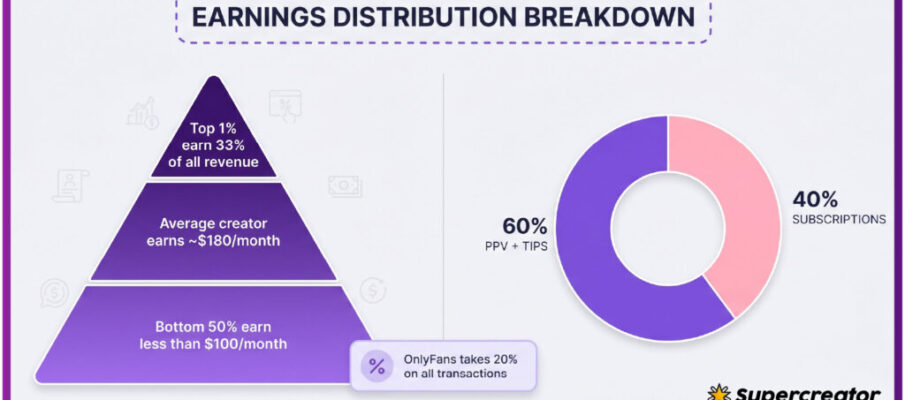
Because the platform charges a 20% fee on everything, including subscriptions, tips and pay-per-view, the creator keeps 80% of each payment. That detail matters on a shared device for a simple reason: any payment made from an unattended session is a real cost, and it is charged to whatever card is already on file.
A session that is still open can complete a purchase without asking for a password again. If the card on file is shared with a partner or a parent, the charge appears on a statement that someone else reads.
There is also a renewal trap worth knowing. When a creator raises the subscription price, auto-renew stops, and existing access lasts only until the current paid period ends. Anyone who shares a device may notice a lapse in access and resubscribe at the higher price without the account owner’s knowledge.

Browser choices for shared machines
The browser decides how much of a session survives after the visit ends. A standard window keeps cookies, history and autofill data together, which is the worst combination on a shared machine. Private windows discard cookies when they close, but they do not hide activity from someone watching the screen. Separate browser profiles keep the account’s data in its own container, which is the strongest option short of a dedicated device. Guest mode sits between the two: it clears most data at the end of the session but still uses the same installed browser.
- Private or incognito window: cookies clear on close, no history entry, weakest against an observer.
- Separate browser profile: own cookies, history and autofill, strongest isolation on one machine.
- Guest mode: clears most session data at the end, available on most desktop browsers.
- Second browser installed for that account only: keeps data fully apart from the household’s main browser.
- Dedicated device or work profile: the most separation, but the most effort to maintain.
Private windows are often treated as a privacy tool, but they only cover the trail left behind, not the screen in front of you. On a shared machine, a separate profile paired with a sign-out habit covers both.

A sign-out routine that holds
Signing out of the website is not enough if the mobile app on the same account stays logged in. The app holds its own session, and it will keep receiving message notifications on a shared phone. The routine below covers both surfaces, plus the tabs and autofill entries that a browser may restore later.
- Sign out in the browser, then close all related tabs before shutting the lid.
- Open the mobile app, go to settings and sign out there as well.
- Delete the saved password from the browser and from the phone’s keyboard dictionary.
- Remove the card entry only if the device is genuinely shared and the risk justifies the re-entry cost.
- Confirm the sign-out by loading the site once and checking that the login screen appears.
The final check is the one most people skip. Loading the site after signing out proves the session is gone rather than assuming it is. Two minutes of routine replaces a much longer recovery process if the account is used by someone else.

Comparing access setups
Households differ in how much effort they will accept for privacy. The table below ranks common setups by how well they protect a session and how much work they add to each visit. Cost matters too, but most of these options use hardware people already own.
| Setup | Privacy level | Effort per visit |
| Shared browser, stays signed in | Low | None |
| Shared browser with manual sign-out | Moderate | Low |
| Private window with manual sign-out | Moderate to high | Low |
| Separate browser profile with sign-out | High | Moderate |
| Second browser installed for one account | High | Moderate |
| Dedicated device for the account | Highest | Low after setup |
The middle rows are where most households land. A separate profile with a sign-out habit costs a few seconds per visit and removes the common failure of a forgotten tab. Ranking services such as the one behind BestOnlyFans focus on comparing public profile prices, promotions, activity and media counts, so they are useful for judging what a subscription costs, not for securing a login.

Two-factor prompts on shared phones
Two-factor authentication adds a code step that a shared phone can complicate rather than solve. If the recovery number belongs to a family phone, the person holding that phone sees every code, including codes for logins they did not start. The same problem applies to email recovery on a shared inbox. Moving the second factor to an authenticator app on a personal device removes the interception risk without weakening the protection. Backup codes should be printed or stored somewhere private rather than left in a shared notes app.
A practical starting point is best only fans youtube, which lists pages by the signals above.
- Free pages: no subscription charge, spending limited to tips and pay-per-view messages.
- Typical paid pages: $4.99 to $15 per month, with averages sitting between $5 and $10.
- Paid subscription range across the platform: $4.99 at the minimum up to $49.99 at the maximum.
- No base price sits below $4.99; only promotional first months may dip under that figure.
- Platform fee: 20% on subscriptions, tips and pay-per-view, with the creator keeping 80%.
- Price rises: auto-renew stops, and access lasts until the current paid period ends.

Autofill and password manager traps
Saved credentials defeat a sign-out routine because the browser offers to log back in with one tap. Anyone using the device can accept that offer without knowing the password.
- Leaving the browser’s password store enabled for the site after signing out.
- Allowing the phone keyboard to learn and suggest the login email address.
- Keeping a password manager vault unlocked when the device is handed to someone else.
- Relying on a private window while the password remains saved in the main profile.
- Assuming a cleared history also clears cookies, autofill and saved sessions.
Autofill is convenient in a household where everyone trusts each other, and it becomes a liability the moment that assumption changes. Removing the saved entry costs about thirty seconds and cannot be undone by anyone who picks up the device later.
When someone else used your device
The account settings usually show active sessions with device type and approximate location. Unfamiliar entries are the clearest signal that someone else signed in.
A quick audit beats a slow investigation. Check active sessions first, sign out everywhere, then change the password. Do the same for the linked email, since a shared inbox often holds the reset link.
Once the account is secured, the household rules below prevent a repeat. Setup takes a single evening.
A phishing link usually copies a familiar billing screen to capture card details.
Low-effort permanent setup
A permanent configuration removes most of the daily decisions. The idea is to make the private option the default and the risky option inconvenient.
| Rule | What it prevents |
| One browser profile per adult user | Shared cookies and shared history |
| No saved passwords on shared devices | One-tap re-entry after sign-out |
| Authenticator app instead of SMS codes | Code interception on a shared phone |
| Monthly session check in account settings | Unnoticed logins from other devices |
| Sign out at the end of every visit | Open billing and message screens |
These rules also make subscription costs easier to track, since a locked session keeps casual spending visible only to the account owner. Sources such as best only fans youtube cover pricing and platform news in video form, while comparison sites like BestOnlyFans publish rankings built from public profile prices, promotions, activity and media counts.
BestOnlyFans refreshes its rankings every month.
FAQ
Does closing the browser tab sign me out?
No. The session cookie usually survives, so the account stays signed in until the sign-out option is used or the cookies are cleared.
Is a private window enough on a shared laptop?
It clears cookies when the window closes, but it does not hide the screen or stop someone from watching, so pair it with a sign-out habit.
Why is my subscription price changing?
Creators can raise prices. When that happens, auto-renew stops and access continues only until the current paid period ends.
What should I check after a suspicious login?
Review active sessions, sign out of all devices, change the account password and check the payment history for charges you did not make.